


PAeDocket
3.9376.00 Reviews
App Specs
- Version
- 1.4
- Updated On
- License
- Free
- Downloads
- 500,000+
- Developer
- Supreme Court of Pennsylvania
- Categories
- Books & Reference
- Platform
- Android, iOS
Screenshots
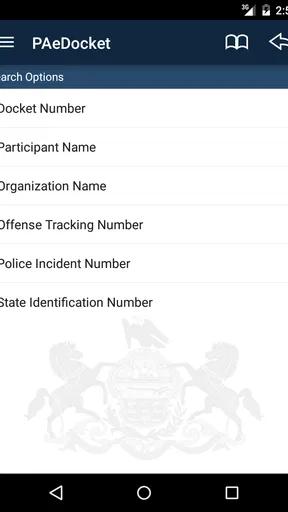
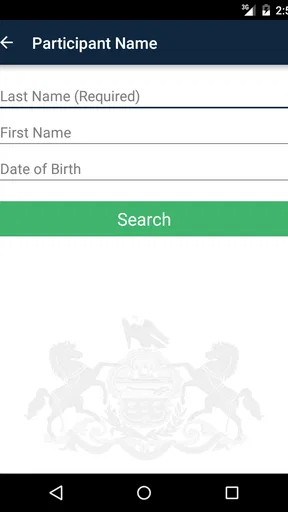
 Analysis by AppCompare
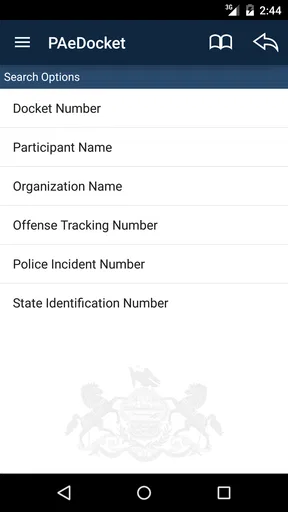
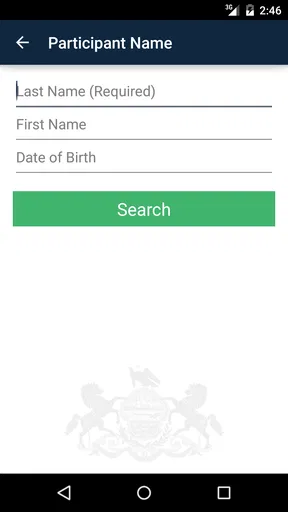
When I need to check a Pennsylvania court case away from a desktop, I want a direct path from a name or case detail to a useful result. That is the situation where PAeDocket makes sense. It is a free Books & Reference app from the Supreme Court of Pennsylvania, built around searching Pennsylvania court cases from a mobile device rather than offering a broad legal library.
I found its value in the narrowness of that purpose. It is not trying to replace a lawyer, explain every legal term, or act as a general reading app. Instead, it gives people a practical way to begin a case lookup when they are at work, in a courthouse waiting area, speaking with a client, or simply away from a computer. The app is rated for Everyone, and its current version is 1.4, with support beginning at Android 5.0.
From a question to a case search
I find the first useful step is to turn a broad concern into a searchable question: identify the person or case as precisely as you can before opening the lookup. That preparation helps me judge whether a result is genuinely relevant, rather than simply the closest match. Next, I look at how to move from that initial search to a careful reading of the case record.
Starting with the right information
The first part of using PAeDocket is deciding what you are actually trying to find. A vague question such as “What happened with that case?” is harder to act on than a party name, docket reference, or another identifying detail. I recommend gathering the most precise information available before opening the search screen. That small preparation makes the mobile workflow much less frustrating.
This matters because court records can involve similar names, multiple proceedings, or separate entries connected to the same people. A quick search is useful, but a quick search is not automatically a precise search. I treat the first result as a lead to inspect, not as proof that I have found the correct matter.
For an ordinary user, the app’s strongest advantage is that it puts this starting point in a familiar phone-based setting. I do not have to wait until I am back at a computer to begin checking a Pennsylvania case. For a legal professional, the benefit is more practical: a case lookup can happen during a conversation, provided the information being entered is accurate enough to narrow the results.
Moving through the lookup
The core experience is intentionally focused on searching. I enter the available case information, review the returned possibilities, and open the entry that appears to match. That sounds simple, but the useful skill is knowing when to slow down. Names should be checked carefully, and I would compare the details shown in a result with the information already in hand before passing anything along.
Worth Reading Before You Choose

EA SPORTS FC Mobile 26 Is a Bigger Football Game, but It Takes Time

Flipboard Shows What News Apps Must Do Beyond the Feed

Switching to Android Auto Means Rethinking Your Driving Routine

Google Calendar Makes a Crowded Week Easier to Manage

Ludo King Makes the Most of the Minutes Between Plans

Baby Panda World Brings Quick Play to Modern Phones, but Its Game Library Feels Busy
The app is best understood as an access point to court information, not as an interpretation layer. It can help me locate a record, but it does not turn a docket entry into legal advice. If I am trying to understand what a filing means, what a deadline requires, or what action should come next, I would still consult the relevant court material or a qualified professional.
One practical habit is to write down the exact identifying details from a promising result before leaving the screen. That creates a cleaner handoff later, especially if another person needs to continue the research on a larger display. It also reduces the risk of relying on memory after switching between the app, messages, notes, and other documents.
Reading the result instead of stopping at the match
Finding a matching case is only the middle of the workflow. I pay attention to the information attached to the result and ask whether it answers the original question. If I was checking whether a case exists, the match may be enough for the immediate task. If I need to understand its progress or communicate accurately with someone else, I need to examine the available record more carefully.
This is where a phone can become both convenient and limiting. A compact screen is excellent for a quick confirmation, but less comfortable when I need to compare several entries or read a long sequence of case activity. My preferred approach is to use the app for discovery and confirmation, then move to a larger screen or official source when the task becomes detailed.
The most important distinction is between locating a case and interpreting a case. PAeDocket helps with the first job. The second may require patience, additional documents, and professional context.
Handoffs between people and devices
A realistic example is a family member calling about a Pennsylvania court matter while I am away from my desk. I can use the information they provide to start a search, check whether the result appears to correspond to the right person, and report the identifying details back to them. If the question becomes more complicated, I can hand those details to a lawyer, clerk, advocate, or relative who is better placed to examine the matter.
That handoff is where disciplined note-taking helps. I would record the case identifier and the wording of the relevant entry rather than sending a casual message such as “I found it.” The recipient then has something concrete to verify. This workflow is especially useful when the person who needs the information is not the person holding the phone.
Another handoff happens between mobile checking and desktop research. On the phone, I can establish whether I am looking at the right case. On a computer, I may be able to read more comfortably, compare information, and prepare a clearer explanation. PAeDocket works well as the first link in that chain, but I would not make it the entire chain for a serious legal decision.
What the app is good at in everyday use
Its best use cases are short, focused lookups. Someone may need to confirm a case reference before contacting an office. A legal worker may want to check a record while traveling between appointments. A person researching a public Pennsylvania court matter may want a convenient starting point instead of opening a general web search and sorting through unrelated pages.
The app also suits users who prefer a dedicated tool over a browser tab. A focused app reduces the temptation to search the wider internet for unofficial summaries, which can be incomplete or confusing. Starting with the Pennsylvania court system’s own application gives the lookup a more appropriate point of entry.
Still, I would skip it if my goal is broad legal education, nationwide case research, document drafting, or personalized advice. It is also not the right choice when I need a polished research workspace with extensive comparison tools. In those situations, a desktop browser, a specialist legal database, or direct professional assistance is more suitable.
Where the flow becomes uncomfortable
The narrow purpose that makes PAeDocket easy to understand also limits it. A person unfamiliar with court terminology may not know which detail to enter or how to judge two similar results. The app can support the search, but it cannot remove the ambiguity that comes from incomplete information.
Mobile reading is another point of friction. A phone is convenient for a quick check, yet it is not always the best place to study a complicated record. Small text, repeated navigation, and switching between notes can make a detailed review feel slower than expected. I would use the app confidently for a targeted lookup, but I would not promise that every research task will feel comfortable on a handset.
There is also a human risk: users may treat an official-looking result as a complete explanation. A court record can be important without answering every practical question a person has. The safer workflow is to use PAeDocket to identify and verify the relevant matter, then seek proper clarification before acting on anything legally significant.
How it compares with the usual alternatives
Compared with a general web search, PAeDocket is more focused because it begins with Pennsylvania court-case lookup rather than the entire internet. That focus can save time and reduce the chance of landing on commentary, outdated summaries, or unrelated results. The trade-off is that a general search engine may be better for finding background explanations once the case has been identified.
Compared with a desktop browser, the app wins on immediacy. I can begin the process from a phone without setting up a larger workspace. The browser usually wins when I need to keep several pages open, read lengthy material, or compare information side by side.
Compared with paid legal research services, the free price is a major practical advantage for casual users and basic case checks. Specialist services may be better for professionals who need deeper research, broader coverage, advanced organization, or extensive historical context. PAeDocket is not competing with those tools on breadth; it is useful because it handles a narrower first step without charging for access to the app.
Who should install it
I would recommend PAeDocket to Pennsylvania residents, families, students, journalists, advocates, and legal workers who regularly need a quick way to start checking court cases. Its Everyone age rating makes it broadly approachable, although the subject matter itself can be serious and sometimes difficult to understand without context.
The app has also reached a substantial audience, with more than five hundred thousand installs and an average rating of 3.9 from around one thousand ratings. Those figures suggest that it is a recognized utility rather than an obscure experiment, but they do not remove the need to judge whether its focused workflow matches your own needs.
I would be more cautious about recommending it to someone who expects step-by-step legal guidance. It is not a substitute for a court clerk’s explanation, an attorney’s advice, or careful reading of official materials. If a user cannot identify the case accurately, the app may feel unhelpful even when the search itself is working as intended.
Small habits that improve the experience
First, I would begin with the strongest identifier available instead of trying several loose searches at random. This reduces the number of possible matches and makes it easier to notice when a result does not belong to the person or matter being researched.
Second, I would separate “search notes” from “legal conclusions.” My notes would contain the search terms, the matching details, and the wording I need to pass on. I would avoid turning those notes into a prediction about what the court will do. That simple separation prevents a lookup from being mistaken for advice.
Third, I would use the app at the beginning of a workflow, not necessarily at the end. Once I have identified the relevant case, I can decide whether the next step is contacting someone, checking additional official material, opening a larger screen, or asking a professional for help. This keeps the app in the role where it is most effective.
Finally, I would verify important information before sharing it. A quick phone result can be useful, but a mistaken identity or misunderstood entry can create unnecessary stress. The extra moment spent comparing the result with the original details is worthwhile.
My final assessment
PAeDocket is a practical, specialized reference app rather than a complete legal research environment. I like it most when I have a clear Pennsylvania case-related question and need a convenient starting point while using a phone. The free access and focused purpose make it easy to justify keeping available, particularly for people who deal with Pennsylvania court matters more than occasionally.
Its weaknesses are tied to the same design choice that gives it value. It does not replace interpretation, detailed document review, or professional guidance, and a small screen can make extended research tiring. Users who expect broad legal explanations may come away disappointed, while users who need a quick case lookup will understand the app more quickly.
My recommendation is straightforward: install it if your goal is to search Pennsylvania court cases efficiently and hand reliable identifying information to the next person or device in your workflow. Use it as a doorway into the record, not as the final authority on what that record means. For that specific job, the Supreme Court of Pennsylvania’s app remains a useful and sensible tool.
Pros
- Searches court cases by party name
- docket number
- or attorney.
- Provides access to Pennsylvania appellate court opinions and docket details.
- Case updates can help users monitor filings and procedural changes.
- Useful for attorneys
- journalists
- researchers
- and self-represented litigants.
- Official court information improves confidence in the displayed records.
Cons
- Coverage is focused on Pennsylvania appellate courts
- limiting broader use.
- Some documents may require additional steps or fees to obtain full copies.
- Search results can be difficult to refine when names or case details are common.
- Legal terminology and docket entries may be confusing for casual users.
- Information availability depends on court updates and internet connectivity.
FAQs for PAeDocket
What is PAeDocket used for?
PAeDocket is Pennsylvania’s official mobile tool for searching publicly available court docket information. After installing it, users can look up cases from participating Pennsylvania courts, review basic case details, and follow docket activity such as filings, scheduled events, and case status. It is mainly intended for quick access to court records rather than detailed legal research or document management.
Can I search for any Pennsylvania court case in PAeDocket?
PAeDocket provides access to many Pennsylvania court records, but its coverage is not unlimited. Search availability can depend on the court, case type, record age, and whether information is restricted or confidential. Some cases may not appear immediately, and sealed, expunged, juvenile, or otherwise protected records may be unavailable. Always confirm important information with the relevant court.
Is the information in PAeDocket official and up to date?
PAeDocket connects users with court docket information, but displayed records should not automatically be treated as a certified court document. Updates may take time to appear, and technical or administrative delays can occur. When reviewing a case, check the date and details of the latest entry, and contact the court directly if you need an official copy or must verify a deadline.
Does PAeDocket provide legal advice or complete court documents?
No. PAeDocket is an information and case-search application, not a legal advice service. It can help you view docket entries and general case information, but it does not explain what a legal entry means in your specific situation, recommend a legal strategy, or replace an attorney. It also may not provide every filing or a certified copy of court paperwork.
Is PAeDocket free, and what should I know about using it?
PAeDocket is generally available as a free public-service application, although normal mobile data charges may apply when you use it away from Wi-Fi. The app may require an internet connection and can occasionally experience maintenance, search limitations, or compatibility issues depending on your device. Avoid relying on screenshots alone for legal matters, and protect sensitive case information when using the app in public.


